
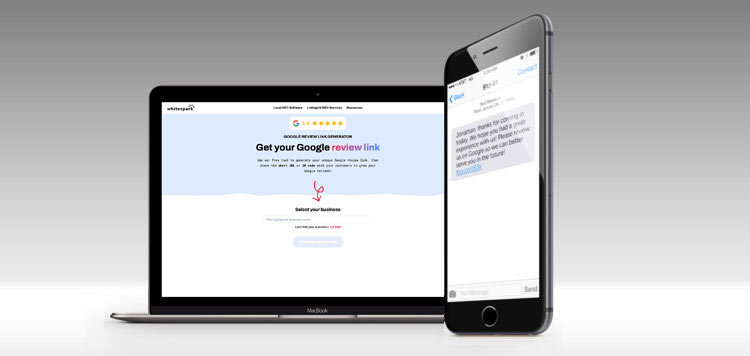
Increase your Google reviews by actively engaging with customers, requesting reviews through email and SMS, adding review links to your website, leveraging feedback surveys, using “Leave Us a Review” cards, engaging with on-site customers, printing QR codes with review links, and asking for reviews on social media. Make sure your Google My Business listing is verified and up-to-date, check for any removed spam or inappropriate reviews, and contact Google support for assistance with missing legitimate reviews.
Additionally, include your Google review link in your email signature to encourage customers to leave reviews. By implementing these strategies, you can boost your Google reviews and enhance your online reputation.
Importance Of Google Reviews For Businesses
Increasing your Google reviews is crucial for businesses as it boosts online visibility and credibility. To achieve this, try sharing the review link via email and SMS, add it to your website, leverage feedback surveys, print “Leave Us a Review” cards, engage with on-site customers, print QR codes with review links, and ask for reviews on social media.
Google Reviews have become an essential element of online reputation management for businesses. The impact of these reviews extends beyond just a star rating on your Google listing. Here’s why Google Reviews are important for businesses:
Impact Of Google Reviews On Online Reputation:
- Google Reviews contribute significantly to a business’s online reputation. They serve as a virtual “word-of-mouth” platform, allowing potential customers to gauge the quality and credibility of your products or services.
- Positive Google Reviews can be a powerful tool in attracting new customers. Studies have shown that consumers are more likely to trust businesses with positive reviews and are more inclined to choose them over competitors.
- On the other hand, negative Google Reviews can have a detrimental impact on your reputation. Customers often rely on these reviews to make informed decisions, and a negative review can lead potential customers to choose your competitors instead.
Influence Of Google Reviews On Local Seo Rankings:
- Google Reviews play a crucial role in local SEO rankings. Higher review ratings and the total number of reviews can boost your visibility in local search results and ultimately drive more traffic to your website or physical store.
- Google’s algorithm takes into account the quantity and quality of Google Reviews when determining search rankings. The more positive reviews you have, the higher your chances of appearing at the top of the search results page.
- Encouraging customers to leave reviews can also generate valuable user-generated content, which can enhance your SEO efforts. This content contains relevant keywords and phrases that can improve your organic search visibility.
Role Of Google Reviews In Building Trust And Credibility:
- Google Reviews build trust and credibility for your business. They provide social proof that others have had a positive experience with your brand, giving potential customers confidence in your products or services.
- Positive Google Reviews act as testimonials that highlight the strengths and value of your business. They showcase the level of customer satisfaction, which can influence purchasing decisions.
- Google Reviews also demonstrate that your business actively engages with customers and values their feedback. Responsiveness to reviews, whether positive or negative, shows that you prioritize customer satisfaction and are committed to delivering a great experience.
In today’s highly competitive digital landscape, Google Reviews can make or break a business. By actively managing and leveraging these reviews, businesses can enhance their online reputation, improve local SEO rankings, and build trust and credibility with potential customers. So, don’t underestimate the power of Google Reviews in shaping your business’s success.

Credit: www.boostability.com
Strategies To Encourage Google Reviews
Discover effective strategies to encourage Google reviews and increase your online reputation. Share the Google review link with customers via emails and SMS, add the review link to your website, use feedback surveys to gather reviews, and engage with on-site customers.
You can also print “Leave Us a Review” cards, ask for reviews on social media, and print QR codes with the review link embedded. By implementing these techniques, you can boost the number of Google reviews and enhance your business’s online presence.
Providing Outstanding Customer Service:
- Prioritize customer satisfaction: Make sure your customers have a positive experience with your business by providing excellent customer service.
- Train your staff: Ensure that your employees are knowledgeable, friendly, and helpful to create a welcoming environment for your customers.
- Promptly address customer concerns: Respond quickly and effectively to any complaints or issues raised by customers to show that their feedback is valued.
- Personalize interactions: Take the time to understand your customers’ needs and preferences, and tailor your service to meet their expectations.
Offering Incentives for Reviews:
- Provide rewards or discounts: Offer incentives such as discounts, freebies, or exclusive offers to customers who leave a review on Google.
- Create a referral program: Encourage customers to refer their friends and family to your business by offering rewards for each referral.
- Hold contests or giveaways: Organize contests or giveaways where customers can enter by leaving a review, increasing motivation to participate.
Implementing Review Request Emails/SMS:
- Send personalized emails or SMS: Reach out to your customers after their purchase or interaction with your business and kindly request them to leave a review on Google.
- Make it easy for customers: Include a direct link to your Google My Business page in the email or SMS, making it convenient for customers to access and leave a review.
- Set up automated reminders: Use email marketing software to send reminder emails at regular intervals to customers who haven’t yet left a review.
Utilizing Feedback Surveys to Generate Reviews:
- Create online surveys: Design feedback surveys to gather valuable insights from your customers and ask them to leave a review as part of the survey process.
- Offer an incentive: Provide a small reward or discount to customers who complete the survey and leave a review.
- Keep surveys short and simple: Make the surveys user-friendly and easy to complete to encourage more customers to participate.
Creating “Leave Us a Review” Cards:
- Design eye-catching cards: Create visually appealing cards that include instructions on how to leave a Google review and distribute them to customers after their visit or purchase.
- Include QR codes or short links: Simplify the process by including QR codes or short links on the cards, allowing customers to quickly navigate to your Google My Business page.
- Display cards prominently: Place the cards at your cashier counter, reception desk, or any other location where customers can easily spot them.
Engaging with On-Site Customers:
- Encourage feedback in person: Train your staff to ask customers for feedback or reviews directly during their visit or purchase.
- Provide review assistance: Offer support to customers who are unfamiliar with leaving reviews online, guiding them through the process step by step.
- Thank customers for leaving reviews: Show your appreciation by responding to reviews with personalized and heartfelt messages.
Leveraging Social Media to Ask for Reviews:
- Utilize social media platforms: Engage with your social media followers and post requests for reviews on platforms such as Facebook, Instagram, and Twitter.
- Share positive reviews: Highlight positive reviews on your social media channels to encourage others to leave their feedback as well.
- Run social media campaigns: Create specific campaigns that incentivize customers to leave reviews on Google, such as contests or giveaways.
Remember, the key to increasing your Google reviews is to consistently provide outstanding customer service, offer incentives, and actively encourage feedback from your customers. Implement these strategies and watch your review count grow, boosting your online reputation and attracting more potential customers.
Optimizing Your Google My Business Listing
To optimize your Google My Business listing and increase your Google reviews, make sure your listing is verified and up-to-date. Share the review link via email and SMS, add the review link to your website, and engage with on-site customers to encourage them to leave reviews.
Additionally, leverage feedback surveys, print “Leave Us a Review” cards, and ask for reviews on social media to boost your Google review count.
:
- Verifying and Updating Your Google My Business Listing:
- Ensure that your Google My Business listing is verified to gain more visibility and credibility.
- Keep your listing up-to-date by adding accurate information such as business hours, contact details, and address.
- Monitoring and Responding to Reviews:
- Regularly monitor the reviews on your Google listing to stay informed about customer feedback.
- Respond promptly to both positive and negative reviews to show that you value your customers’ opinions.
- Dealing with Negative Reviews:
- Address negative reviews with professionalism and empathy.
- Take the conversation offline by offering to resolve the issue privately.
- Learn from negative feedback and make improvements to prevent similar issues in the future.
- Encouraging Customers to Leave Reviews on Your Google Listing:
- Provide exceptional service and experiences to encourage customers to leave positive reviews organically.
- Request reviews from satisfied customers through personalized follow-up emails or SMS.
- Offer incentives such as exclusive discounts or loyalty rewards for customers who leave reviews.
- Displaying the Google Review Link on Your Website and Email Signature:
- Make it easy for customers to leave reviews by placing a prominent review link on your website.
- Include the Google review link in your email signature to encourage recipients to share their feedback.
Remember, optimizing your Google My Business listing is crucial for attracting more reviews and boosting your online reputation. Actively engage with your customers and provide exceptional experiences to generate positive reviews organically.
Frequently Asked Questions Of How To Increase Your Google Reviews
How Can I Increase My Google Reviews Fast?
To increase your Google reviews fast, verify and update your Google My Business listing, remove any inappropriate reviews, and contact Google support if legitimate reviews are missing. Share the Google review link via email and SMS, add the review link to your website, leverage feedback surveys, print “Leave Us a Review” cards, engage with on-site customers, print QR codes with review links, and ask for reviews on social media.
Additionally, include your Google review link in your email signature and be active on your company’s social media. Using pop-ups to ask for feedback after a customer makes a purchase can also be effective.
How Many 5 Star Reviews Does It Take To Increase Google Rating?
To increase your Google rating, there is no specific number of 5-star reviews required. However, the more positive reviews you have, the higher your rating is likely to be.
Why Are My Google Reviews Not Increasing?
Your Google reviews may not be increasing because your business is new and it takes time for rankings to improve.
How Do I Get My Reviews To Show Up On Google?
To get your reviews to show up on Google, follow these steps: 1. Verify and update your Google My Business listing. 2. Check for and address any spam or inappropriate reviews that Google may have removed. 3. If a legitimate review is missing, contact Google support for assistance.
4. Share the link to your Google Review via email, SMS, and on your website. 5. Use feedback surveys to encourage customers to leave Google reviews. 6. Print cards or QR codes with the review link to hand out to customers.
7. Engage with on-site customers and ask for reviews on social media. 8. Consider adding a link to review your business on Google in your email signature. 9. Be active on your company’s social media to improve local rankings. 10.
Use pop-ups to ask for feedback after a customer makes a purchase from your online store. Remember to ask your loyal customers for reviews and make it easy for them to leave feedback on Google.
Conclusion
In order to increase your Google reviews, you need to follow a few key strategies. Firstly, ensure that your Google My Business listing is up-to-date and verified. Check for any spam or inappropriate reviews that Google may have removed. If a legitimate review is missing, reach out to Google support for assistance.
Additionally, share your Google review link via email and SMS, and add the review link to your website. You can also leverage feedback surveys to encourage customers to leave reviews, and print “Leave Us a Review” cards for on-site customers.
Engaging with customers on social media and asking for reviews can also be effective. Lastly, consider using pop-ups to ask for feedback after a customer makes a purchase on your online store. By implementing these strategies, you can increase your Google reviews and improve your online reputation.
So why wait? Start boosting your Google reviews today!
